
Guitar Tuner Pro: Music Tuning
MWM - AI Music and Creative AppsMusic & Audio
4.31.36K Reviews
- Version
- 1.42.00
- Installs
- 5.00M
- Age Rating
- Everyone
Screenshots
Our Review of Guitar Tuner Pro: Music Tuning
 Analysis by Appyee
If you've ever tried to tune a guitar by ear, you know it can be a bit like trying to find a needle in a haystack. Enter Guitar Tuner Pro: Music Tuning, a nifty app that's here to save the day—or at least your ears. I took it for a spin, and here's the lowdown.
When a tuner meets a real rehearsal routine
The most useful way to judge a tuning app is not by opening it once in a quiet room, but by seeing whether it fits into the small pauses that happen around music. I can imagine reaching for this one before a lesson, while changing instruments between songs, or when a friend hands me a guitar that sounds slightly off. Its appeal is that tuning is the main event rather than one feature buried inside a broader music-making suite.
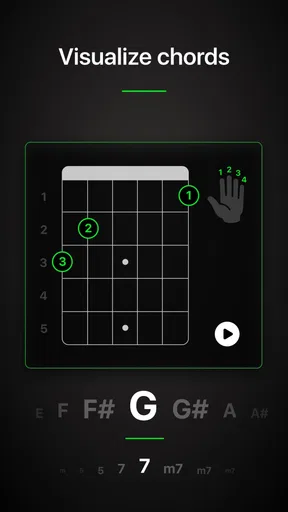
That focus also shapes who is likely to enjoy it. A beginner who is still learning how a correctly pitched string should sound gets a visual reference instead of having to rely entirely on ear training. A player who already knows the basics can use the tuner as a quick check before practice. If you switch between guitar, ukulele and bass, having those instruments represented in one app can be more convenient than keeping separate tuning tools around.
There is a trade-off, though: a phone tuner depends on the phone being available and positioned where it can hear the instrument clearly. It is not the same as clipping a tuner directly onto a headstock. In a quiet practice room that may not matter; in a noisy room, with other players warming up, a physical clip-on tuner can be the easier choice because it senses vibration from the instrument rather than relying on the surrounding sound.
Network moments and what to plan for
A tuner is most valuable when it gets out of the way. I would open the app before a practice session, choose the instrument and tuning I need, then leave the phone nearby while I work through the strings. When the connection is weak or unavailable, it is sensible not to assume every part of the app will behave exactly as it does online. If you expect to tune somewhere with patchy service, try the workflow ahead of time rather than discovering a connection-related snag just before you play.
That is particularly useful for people who rehearse in shared spaces, travel with an instrument, or tune between lessons. A quick check at home can tell you whether the interface and the tuning choices you need are ready for your usual routine. I would also avoid making a network-dependent purchase decision in the middle of a rushed setup: check the available options and any purchase prompts when you have time, then keep the tuning task itself simple.
For a casual session, the app can be a handy companion; for a performance where every second counts, I would still bring a backup method. That could be a physical tuner or a musician in the group who can help check pitch. This is not a criticism unique to this app: a phone-based tool introduces an extra device and possible distractions, so a backup is practical for any important gig.
Making phone-based tuning more dependable
For better results, I would tune one string at a time and let each note ring clearly before moving on. Muting the other strings helps reduce confusion, especially if the room is lively or the instrument resonates strongly. Placing the phone close enough to pick up the note, without resting it on a vibrating surface, is another small but useful habit. These steps do not add features to the app; they simply make a microphone-based tuning workflow easier to manage.
There is also a good reason to check the instrument again after the first pass. Adjusting one string can slightly affect the tension and pitch of others, particularly when an instrument has been sitting unused or has just been moved between environments. I would tune through the strings once, then make a second quick pass rather than assuming the first adjustment settles everything. This is a more reliable routine than chasing tiny movements on just one string for too long.
If you are learning, use the visual response as guidance, not as a replacement for listening. Once the tuner indicates that a note is close, play the string again and notice how it sits against a chord or another instrument. That habit helps you get the immediate benefit of a tuner while gradually building your ear. If you mainly want to practise pitch recognition, a tuner that gives less visual assistance—or deliberate ear-training exercises—may suit that goal better.
First Impressions and Installation
Downloading Guitar Tuner Pro: Music Tuning was a breeze. It's available on both Android and iOS, so I grabbed it from the App Store. The installation process was quick, and before I knew it, I was ready to dive into the world of perfectly tuned strings.
The app greeted me with a clean, intuitive interface. No clutter, just straight to business. I appreciated this because, let's face it, when you're in the mood to jam, the last thing you need is to navigate through a maze of menus.
Features That Stand Out
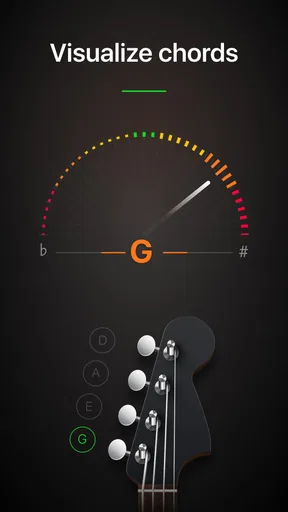
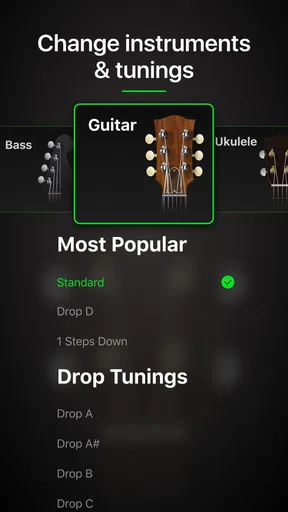
One of the first things I noticed is the variety of tuning options available. Standard tuning? Check. Open tunings? Absolutely. It even has options for those exotic tunings that make you sound like a rock legend. The app supports a range of stringed instruments, not just guitars. So, whether you're a bassist or a ukulele enthusiast, you're covered.
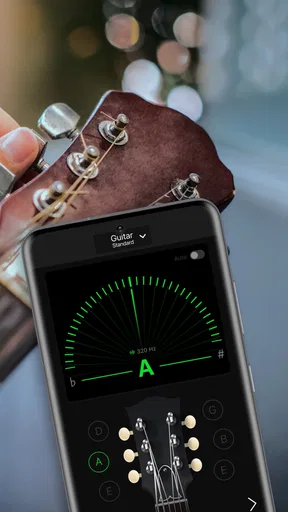
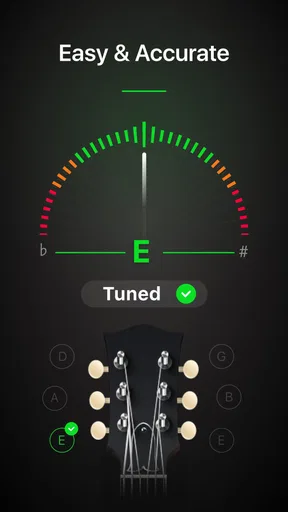
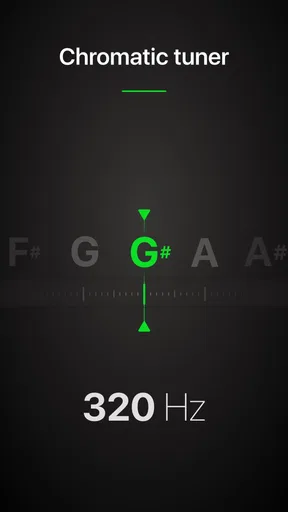
The tuning process itself is smooth. The needle-style tuner is responsive, and I could see real-time feedback as I tuned each string. This is crucial because sometimes, those little adjustments make a big difference.
Usability and Performance
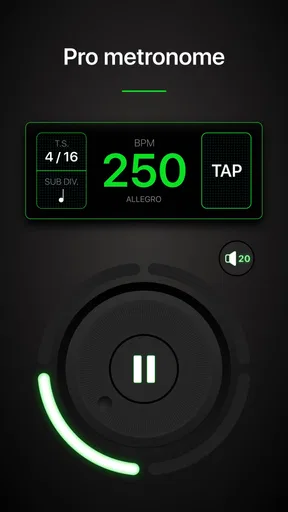
Now, let's talk about usability. The app is straightforward, and the learning curve is virtually non-existent. Even if you’re new to digital tuners, you’ll find this app welcoming. It also offers a metronome feature, which is a nice bonus. Practicing with a beat helps with timing, and it’s like having a mini drummer in your pocket.
Performance-wise, the app is solid. I didn’t experience any crashes or bugs during my testing. It’s lightweight, so it doesn’t hog your phone’s resources. Plus, it works offline, which is a huge plus if you’re planning to use it backstage or on the go.
Choosing it over other music tools
Compared with a dedicated clip-on tuner, a phone app is easier to try without carrying another piece of gear, and it can put tuning and practice tools in the same place. A clip-on model, however, is more convenient when the room is loud or you need to keep your phone free. Compared with a broad music-learning app, this tuner is more direct for the simple job of checking pitch; someone looking for guided lessons, song libraries or a full recording setup should choose a tool designed around those needs instead.
There is a similar distinction with metronomes. The built-in beat is useful when I want to tune and then practise without changing apps, but players who need a more specialised rhythm workflow may prefer a dedicated metronome. The practical advantage here is consolidation, not a claim that one app replaces every instrument accessory. I would treat it as a convenient everyday tool and keep specialised equipment for situations where its particular strengths matter.
Cost, access and sensible expectations
The app is free to install, and its Everyone age rating makes it suitable for a broad audience. MWM - AI Music and Creative Apps is the developer. The current version is 1.39.04, and it requires Android 6.0 or later on Android devices. In-app purchases range from $1.99 to $89.99 per item, so I would look carefully at what is offered before confirming anything. The basic decision is straightforward: try the app for the tuning workflow, and only consider a paid option if a particular extra is genuinely useful to you.
Its 4.3 average comes from around 56,000 ratings, with roughly 1,300 written reviews, and it has over 5 million installs. Those figures suggest that it has found a sizeable audience, but popularity does not guarantee it will suit every setup. I would judge it by whether it recognises your instrument reliably in the places you actually play, and whether its tuning choices match the music you make.
Why It’s Worth Trying
So, why should you give Guitar Tuner Pro: Music Tuning a shot? Well, it’s versatile, reliable, and user-friendly. Whether you're a beginner just learning the ropes or a seasoned musician, this app caters to your needs. The developers have clearly put thought into creating a tool that’s both functional and accessible.
Another thing I appreciate is the lack of intrusive ads. You can focus on tuning and playing without being bombarded by pop-ups, which is a rarity in many free apps these days.
Where the fit is less convincing
I would skip it if you need a tuner that clips onto an instrument, if you often play in very noisy settings, or if your priority is a full practice studio rather than a tuning companion. It is also not the best match for someone who wants to avoid using a phone during rehearsal. In those cases, a simple hardware tuner or a more specialised practice app is likely to feel more dependable.
For a phone-based routine, the key questions are practical: can it hear your instrument in your usual room, does it offer the tuning you use, and are you comfortable keeping your phone nearby while you play? I would check those points during an unhurried practice session. If the answers are yes, the app can remove a small but recurring hassle from getting started; if not, there is no reason to force it into your setup.
Final Thoughts
In conclusion, Guitar Tuner Pro: Music Tuning hits all the right notes. It’s a must-have for anyone who wants to ensure their instrument sounds its best. The combination of ease of use, comprehensive features, and reliable performance make it a standout choice in the sea of tuning apps.
If you're on the fence about trying it, just go for it. Your ears—and your audience—will thank you. Now if you’ll excuse me, I’ve got some strings to strum.
My connectivity verdict is measured: I would make this part of a normal practice setup, but I would test it before relying on it in a place where the network or surroundings may be unpredictable. The app’s strongest case is simple access to tuning across several stringed instruments, with a metronome available for the next step in practice. It is a useful fit for players who value convenience, while a clip-on tuner remains the safer choice when phone placement, noise or connectivity could get in the way.
Verdict
Strengths of Guitar Tuner Pro: Music Tuning
- Accurate tuning for multiple instruments.
- User-friendly interface for quick access.
- Supports alternative tunings.
- Built-in metronome for practice.
- Offline mode available.
Limitations of Guitar Tuner Pro: Music Tuning
- Ads can be intrusive at times.
- Limited free features.
- Requires in-app purchases.
- No custom tuning save option.
- Occasional lag on older devices.
Other Releases by MWM - AI Music and Creative Apps
View All
edjing Mix - Music DJ app
Music & Audio4.6

Beat Maker Pro - DJ Drum Pad
Music & Audio4.6

Piano - music & songs games
Music & Audio4.7

Stemz: AI Tool for Musicians
Music & Audio4.4
Similar Picks in This Category
View All
YouTube Music
Google LLC4.4

Samsung Music
Samsung Electronics Co., Ltd.3.8

Spotify: Music and Podcasts
Spotify AB4.3

JioSaavn - Music & Podcasts
Saavn Media Limited4.3

Lark Player:Music Player & MP3
Lark Player Studio - Music, MP3 & Video Player4.6

StarMaker: Sing Karaoke Songs
SKYWORK AI PTE. LTD.4.3
Frequently Asked Questions
Is Guitar Tuner Pro: Music Tuning suitable for beginners?
Yes, Guitar Tuner Pro: Music Tuning is ideal for beginners. It features an intuitive interface with easy-to-follow instructions, allowing new musicians to tune their instruments accurately. The app provides visual guides and audio cues, making it user-friendly for those unfamiliar with tuning procedures.
Does Guitar Tuner Pro support multiple instruments?
Absolutely, Guitar Tuner Pro supports a wide range of stringed instruments. Besides guitars, you can tune basses, ukuleles, violins, and more. The app offers preset tuning options for each instrument, ensuring a precise tuning experience tailored to your specific needs.
Is there a cost associated with using all features of Guitar Tuner Pro?
While Guitar Tuner Pro offers basic tuning features for free, some advanced functionalities may require a premium upgrade. This includes access to a larger variety of tuning modes, ad-free experience, and additional instrument support. Check the app store for the latest pricing details.
Can I use Guitar Tuner Pro offline?
Yes, Guitar Tuner Pro can be used offline. The app does not require an active internet connection for standard tuning functions. However, if you wish to access certain online features or updates, you will need to connect to the internet.
How accurate is the tuning with Guitar Tuner Pro?
Guitar Tuner Pro is highly accurate, using advanced algorithms to ensure precise tuning. It also provides visual feedback through a needle or LED display, so you can see exactly how close you are to the correct pitch, making it reliable for professional musicians as well.
